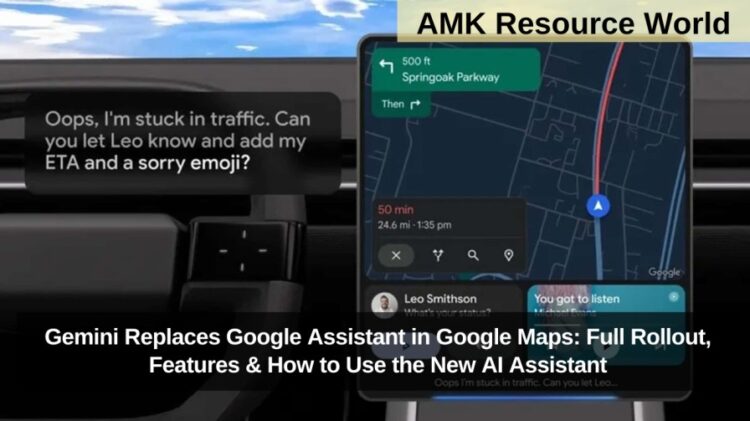
Google has officially begun rolling out Gemini as the primary AI assistant in Google Maps, replacing Google Assistant across navigation modes. Announced earlier this month, the update is now gradually appearing on Android devices, offering users an enhanced, hands-free navigation experience., this development is important for users in India, US, UK, UAE, and other regions relying on Google Maps for driving, walking, cycling, and two-wheeler navigation. According to a 9to5Google report, Gemini has started appearing on select accounts, although availability may vary across devices. Google has also updated its support documentation confirming the new features.
With Gemini built into Maps, users can start navigation, locate stops along the route, share ETA, get recommendations, translate messages, and access conversational Gemini Live, all through natural voice commands. The shift to Gemini removes the need for specific phrases and enables more context-based responses. The assistant understands location-based instructions, integrates with Calendar, reads news updates, and allows drivers to report traffic disruptions using simple phrases like “I see an accident.” This upgrade significantly improves hands-free safety, especially for drivers.
What Gemini Can Do in Google Maps
Google has expanded Gemini’s capabilities across all navigation modes—Driving, Walking, and Two-Wheeler. Key functionalities include:
- Start navigation to any destination
- Find pit stops such as petrol pumps, cafés, hospitals
- Share ETA with contacts
- Translate incoming text messages
- Get restaurant or place suggestions along your route
- Activate Gemini Live for interactive conversations
- Report traffic issues (accidents, flooding, roadblocks)
- Receive news, sports, and schedule updates via voice
- Automatically add events to Calendar
Gemini adapts language and voice preferences based on the signed-in Google account and uses precise location inputs for improved query responses.
How to Use Gemini in Google Maps

Follow these steps to access and use Gemini inside Google Maps:
- Open the Google Maps app on your Android smartphone or tablet
- Begin navigation in any mode (Driving/Walking/Two-wheeler)
- Say “Hey Google” or tap the microphone icon
- Ask Gemini for help using natural language commands
This integration enables a completely hands-free navigation experience, reducing distractions while driving or travelling.
Why Google Replaced Google Assistant with Gemini in Maps?
Google has been shifting its ecosystem toward Gemini as the unified AI model powering all major services. Gemini’s multimodal capabilities make it more powerful and context-aware than Assistant:
- Works with natural, conversational queries
- Enables on-screen understanding of location and surroundings
- Supports complex routing requests
- Integrates cross-app tasks (Messages, Calendar, News)
- Enhances safety with hands-free reporting features
This transition marks Google’s broader move toward embedding AI deeply into everyday productivity.
Frequently Asked Questions
| What is Gemini in Google Maps? |
| It is Google’s new AI assistant replacing Google Assistant for navigation and voice commands. |
| Is Gemini available for all Google Maps users? |
| It is rolling out gradually and may appear first for selected accounts and devices. |
| What can Gemini do in Maps? |
| Start navigation, find stops, share ETA, translate messages, report traffic, and more. |
| How do I activate Gemini in Maps? |
| Say “Hey Google” or tap the microphone icon while in navigation mode. |
| Does Gemini work in all navigation modes? |
| Yes, it works in driving, walking, and two-wheeler modes. |
| Can Gemini translate messages inside Maps? |
| Yes, Gemini can translate texts into other languages while navigating. |
| Can drivers report traffic incidents using Gemini? |
| Yes, with simple voice commands like “I see an accident.” |
| Does Gemini support Calendar and news updates? |
| Yes, it integrates with Calendar and provides news and sports updates. |
The arrival of Gemini in Google Maps marks a major upgrade in navigation and AI support, making hands-free travel safer and more intuitive. Users should watch for the update as Google expands rollout across more devices. For accurate updates, always refer to the official Google support pages, and bookmark this guide for instant reference to new Gemini features.